Why Every Organization Needs a Salesforce Translation Glossary
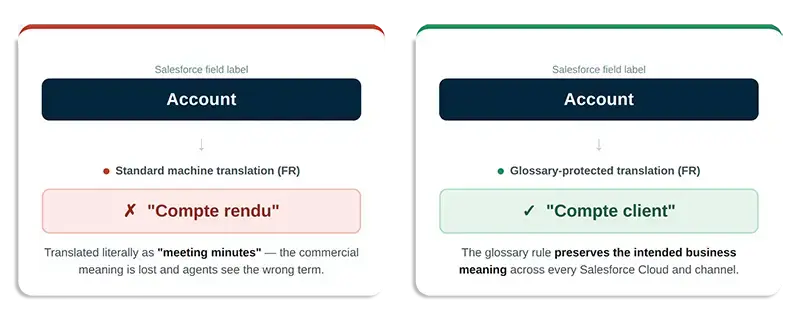
In a globalized economy, an organization’s communication strategy directly shapes its customer experience. As businesses expand customer service and marketing across regions, they face a subtle yet significant threat: the literal translation of proprietary terminology by automated engines. Standard translation engines often translate words in isolation, leading to errors that erode brand trust. For instance, the Salesforce term “Account” might be translated as “Compte rendu” in French (meeting minutes) rather than its intended commercial meaning. To prevent these costly inaccuracies, enterprise organizations must establish a robust Salesforce translation glossary to serve as a terminology guardrail across all Salesforce clouds.
1. Strategic Content Selection: Focus on Exceptions
An enterprise glossary is not a general dictionary. Modern Neural Machine Translation (NMT) and generative Large Language Models (LLMs)—such as ChatGPT, Claude, and Gemini—are context-aware and translate standard vocabulary effectively without intervention.
Instead, your glossary should function as a targeted exception and terminology database, designed to safeguard:
- Proprietary Brands and Product Names: Preventing trademarked software or service names from being translated literally, ensuring global brand consistency.
- Loyalty and Membership Programs: Maintaining uniform program tiers and reward titles across all markets.
- Specialized Jargon and Abbreviations: Protecting technical or company-specific terms that carry unique operational meanings.
For example, IAR Systems stabilized their localized Knowledge Base in Salesforce Experience Cloud by establishing over 20 core product-name exceptions managed entirely in-house.
2. Multi-Format Glossary Coverage
Modern enterprise communication spans various digital mediums. To ensure consistency, a native translation layer must enforce terminology control across all formats:
- Digital Text: Including live chats, support cases, case comments, emails, and custom database fields.
- Voice and Transcripts: Aligning text-to-speech files and real-time transcripts with the established brand voice.
- Documents and Media: Preserving terminology within office files (.docx, .xlsx, .pptx) and marketing text embedded in images.
3. Reducing Administrative Overhead
Traditionally, glossary management was manual and labor-intensive, involving spreadsheet exports and coordination with third-party vendors or external Translation Management Systems (TMS).
By adopting a translation solution 100% native to Salesforce (such as Verbis), you can centralize your Salesforce translation glossary operations. Administrators can modify exceptions instantly, ensuring data remains secure on Salesforce servers while eliminating the need for external technical support.
4. Dynamic Optimization via Live Agent Feedback
A glossary should adapt to real-world customer service scenarios. Verbis facilitates this through a built-in flagging and correction system within the service console, allowing agents to report translation discrepancies in real time.
These flags alert localization administrators, enabling them to refine the glossary immediately. This continuous optimization loop creates a self-improving asset that scales with your global operations, reducing friction in customer service.
Do’s and Don’ts of Glossary Management
THE DO’S (Best Practices)
Protect brands, trademarks, and program names from literal machine translations.
Manage exceptions directly in Salesforce to eliminate technical overhead.
Use a live flagging system to improve the glossary dynamically through agent feedback.
Implement context-aware routing that preserves object structure, tone, and formatting.
THE DON’TS (Common Pitfalls)
Avoid adding common vocabulary, which can lead to grammatical errors and broken inflections.
Do not use external spreadsheets that disrupt agent workflows.
Do not leave high-stakes brand or technical content unmonitored.
Update the glossary regularly to reflect evolving branding and product lines.
5. Quick-Start Operational Checklist
Step 1: Audit and Isolate. Identify and compile a list of your most critical brand names, loyalty tiers, and industry-specific abbreviations.
Step 2: Define Handling Rules. For each term, decide whether to Exclude from Translation (keeping it in English/Source language) or define a specific approved target translation.
Step 3: Enable Native Salesforce Console Access. Embed the glossary management interface directly within the Salesforce Service Console so managers can update it inline.
Step 4: Train Front-line Staff on Flagging. Instruct support agents on how to use the built-in flagging tool to report translation issues or incorrect terminology in real time.
Step 5: Verify Partner Retention Agreements. Confirm that your connected machine translation and LLM partners (such as DeepL Pro) operate under zero-retention agreements to protect data residency.